If your website has no working HTTPS, Google says Chrome now asks people to approve the connection before it opens your page. Google announced the change on 21 October 2026. The fix is a free certificate and a redirect from http:// to https://.
We searched Google Maps for eight trades in East Dulwich, and seven returned a list of results. We tested the websites of the top three for each of those seven: 20 of the 21 had a website, and all 19 sites that answered had a valid certificate, and 17 sent http:// visitors on to https://. The other 2 did not, and both had an http:// address in the website field of their Google profile. The redirect is the fix that matters. Today, run steps 1 and 2 of the 5-minute check, and update your profile link if it still starts http://. Or ask us for a free check.
What Google changed
In Google’s words: “As promised last year, we have now rolled out a change where Chrome explicitly asks users for permission before making an insecure HTTP connection.” Google says it first did this for people using Safe Browsing’s Enhanced Protection mode, “and now we extended this protection to all users by default.” The post names the setting behind it: “The “Always Use Secure Connections” setting warns users before accessing a site without HTTPS”. Google’s caption for its picture of the prompt calls it the “this site doesn’t support a secure connection” warning.
Chrome asks “the first time they visit the site”. Once a visitor approves, Chrome “will not warn again until the user has not visited the site for at least two weeks”. Our reading, not Google’s: people finding you for the first time are the most likely to see it, though a past customer who has not visited for two weeks can be asked again.
Google also says the prompt is not shown by default for addresses that cannot get a public certificate, such as a single-word office address like intranet/ or a local number like 192.168.0.1. A business website on its own domain is not one of those.
What we found on 20 local business websites
On 27 October 2026 we searched Google Maps for eight trades in East Dulwich, London SE22: plumber, electrician, roofer, builder, cleaner, locksmith, gardener and painter decorator. We took the top three results for each. The locksmith search showed no list, so that left 21 businesses, and 20 of them had a website link on their Google profile.
For each of the 20 links, a short script requested four addresses: http:// and https://, each with and without www. It did not follow redirects, and it treated an invalid certificate as an error. For each address it recorded the status code, where any redirect pointed and any certificate error. We did this once, from one place, on one day. Map results vary by who is searching and where. We are not naming the businesses.
| What we checked | Result |
|---|
| Sites with a valid HTTPS certificate on the domain their Google profile links to | 19 of the 19 that answered |
Google profile website links still starting http:// | 12 of the 19 that answered |
Sites with no redirect from http:// to https:// on at least one address | 2 of the 19 that answered |
| Sites that refused our check (an error on every address) | 1 of 20 |
The 2 without a redirect matter most. Chrome may switch to https:// on its own, but other browsers and apps can still land on the insecure page, and both sites had an http:// profile link.
The other 10 http:// profile links lead to sites that redirect to valid https://, so updating them is a tidy-up that removes one hop. One redirecting site also routed its https:// address through an http:// page.
Fix the website link on your Google Business Profile
On a computer, signed in to the Google account that manages the profile:
- Go to your Business Profile. Searching Google for your business name usually brings it up.
- Select Edit profile.
- Change the website field to your
https:// address, then select Save.
On a phone, open the Google Maps app, tap Business at the bottom right, tap Edit profile, change the website field and tap Save. These are the steps on Google’s help page, checked 27 October 2026.
Check your own site in 5 minutes
Chrome can hide one problem. The Chromium team said in 2023 that Chrome would try the https:// version of http:// addresses first, “even when you click on a link that explicitly declares http://”, and fall back to http:// only if that fails. Where Chrome does this, a site with no redirect can look fine in Chrome while other browsers and apps still land on the insecure address.
Check the redirect with a free redirect checker, then use Chrome for the certificate.
- Open a free redirect checker such as httpstatus.io. Enter
http://yourbusiness.co.uk. You want to see a 301 status and a final address starting https://. A 200 status on the http:// address means there is no redirect.
- Do the same for
http://www.yourbusiness.co.uk. Both versions need to end on https://.
- In Chrome, open
https://yourbusiness.co.uk and https://www.yourbusiness.co.uk. Click the icon to the left of the address and look for a message that the connection is secure. A full-page “Your connection is not private” means the certificate is the problem (see below).
- Repeat step 3 on your contact page and any page with a form.
If steps 1 to 3 pass, there is no insecure address for Chrome to warn about. Do not rely on simply opening your own site in Chrome and seeing no prompt: once someone approves a site, Chrome does not ask again unless they stay away for at least two weeks, and the setting may be switched off on your computer.
My host says I have SSL, but the check fails
A certificate only helps if it works for the address the visitor used.
The certificate does not cover every address. A certificate for yourbusiness.co.uk that does not also cover www.yourbusiness.co.uk fails for anyone who types the www. To check, click the icon left of the address and open the connection details, then the certificate details. Look there for the expiry date and the list of addresses the certificate covers.
The certificate has run out or is not trusted. Chrome then shows a full-page “Your connection is not private” warning, a separate and older warning from the new one. Look at the code under the heading. On untrusted-root.badssl.com, a public test page that badssl.com runs to show a certificate from an untrusted issuer, the code was NET::ERR_CERT_AUTHORITY_INVALID. If your code ends DATE_INVALID, check the certificate’s expiry date first.
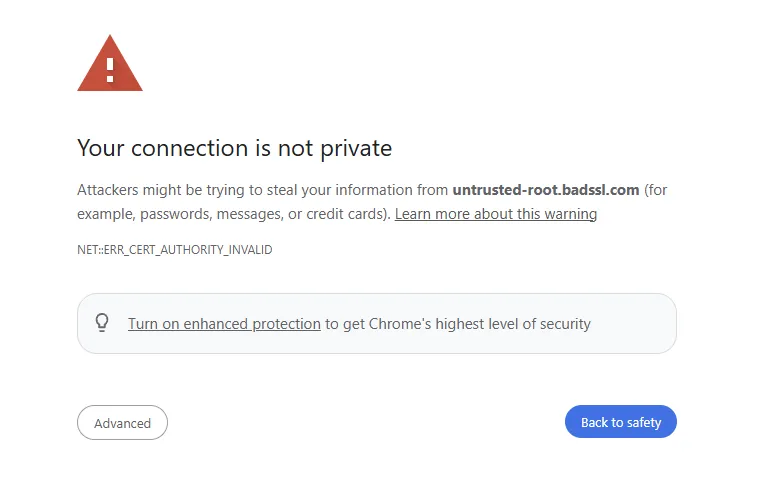
Fix any missing redirect (steps 1 and 2) and mixed content at the same time.
Mixed content. The page loads over HTTPS but pulls in an image, script or form from an http:// address. To find it, open the page in Chrome on a computer, press F12 (Cmd + Option + I on a Mac), click Console and reload. Look for warnings that mention mixed content. They name the http:// file. Change those addresses to https://. On older WordPress sites they are usually image links inside old posts.
If your site fails the check
On Wix, Squarespace or Shopify: each says on its help pages that the certificate is included and switched on automatically (checked 27 October 2026). On Squarespace, its SSL panel should show “Secure (Preferred)”, the default. If the check above still fails, send the platform’s support your web address and a screenshot of the result.
On WordPress or a hosting package: send your host this email, with your own address in place of yourbusiness.co.uk. Then fix any mixed content.
Subject: HTTPS for yourbusiness.co.uk
Hello, please could you do three things for my website, yourbusiness.co.uk:
- Install a free SSL certificate that covers both yourbusiness.co.uk and the www version of it.
- Turn on a permanent (301) redirect from every http:// address to https://.
- Confirm the certificate renews automatically, and tell me its current expiry date.
Thank you.
If you would rather do it yourself, this is where the setting lives on some common hosts, from each host’s own help pages, checked 27 October 2026:
- Hostinger: in hPanel, open the website’s dashboard, go to Security, then SSL, and turn on “Force HTTPS”. See Hostinger’s SSL guide.
- IONOS: Managed WordPress and MyWebsite switch to HTTPS on their own once the certificate is active. On IONOS Web Hosting the redirect is a short rule in a file called
.htaccess, and IONOS’s redirect guide gives the exact lines.
- GoDaddy, 123 Reg and other hosts: look for an HTTPS redirect or Force HTTPS setting in your hosting control panel, or ask your host using the email above.